Installation and Configuration
Before you can start using zPodFactory, you need to install it. This section will guide you through the installation and configuration process.
Requirements are a very important part of the installation process, so please make sure to read them carefully.
Requirements
As you can imagine, if your plan is to deploy various nested environments you will need quite a bit of resources.
Here are some guidelines for the minimum requirements around the physical environment that will be used to host your nested environments.
High Level Diagram
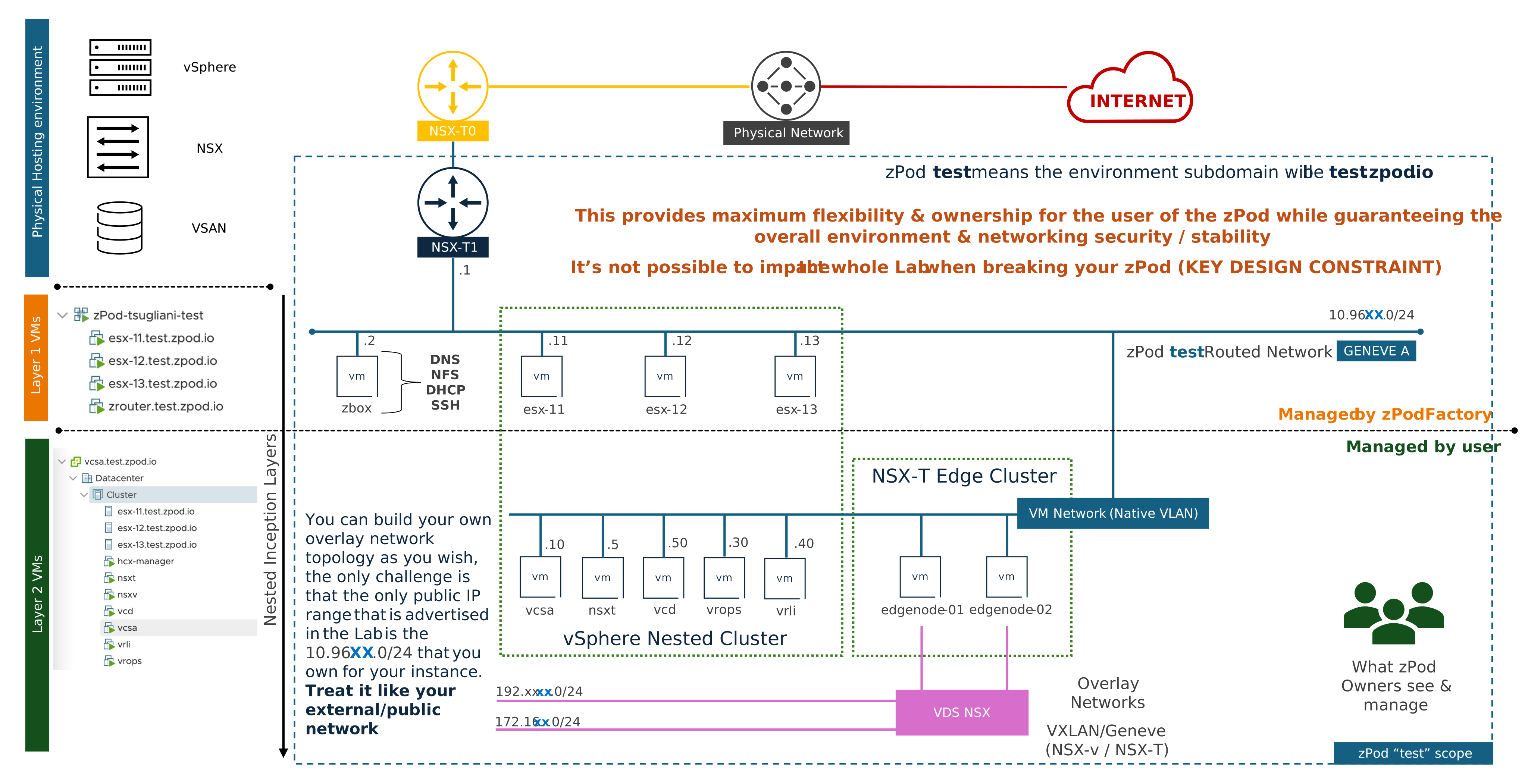
VMware SDDC:
-
vCenter Server 7.0u3+ or later
- At least
4 vCPU / 16GB RAM / 250GB Storage(SSD/NVMe recommended) for the zPodFactory appliance/management VM
The zPodFactory Appliance will likely have a base 50GB disk, but usage will be much lower depending which products you download/use on your nested environments (you will be able to easily extend the disk using LVM if needed, highly recommended to extend the disk to 500GB+ if you plan to use a lot of products)
- At least
-
NSX-T 3.1+ (for
nsxtbasic deployment) or NSX 4.1.1+ (fornsxt-projectsfeatures)- T0 & T1 Gateways pre-deployed and configured for proper N/S connectivity (a T1 could be used to host the zPodFactory appliance/management VM)
- Layer 3 connectivity between the zPodFactory appliance/management VM and the target vCenter Server(ESXi hosts too for OVF/OVA tasks)/NSX Manager, and nested environments (zPodFactory will deploy a T1 linked to a specified T0 for all the nested environments)
- a network supernet for deploying nested environments (
10.10.0.0/20for example, as each nested environment will get a global/24subnet from this supernet, carved into 4 x/26subnets to be used with native vlan and guest vlan tagging within the nested environment) - check this FAQ section for changing the NSX default DLR-MAC address
-
Decent Storage performance (SSD/NVMe) for the nested environments if possible (vSAN OSA/ESA is recommended) - 4TB+ of storage is recommended (depending on the number of nested environments you plan to deploy)
- the zPodFactory Appliance or management vm (if installed manually) should take between 50-500GB of storage (depending how many components will be downloaded/used, and could grow over time)
- check this FAQ section if you are using vSAN on the physical environment.
Please apply common sense here, as this is a
it depends...type of answer :-)
Also from a networking perspective, in addition to the minimum requirements above, you will need to have a few things in place:
- if you plan to connect zPodFactory to multiple
endpoints(an endpoint is a concept that depicts where you deploy a nested environment(zPod), and consists of a vcsa/nsx pair, and mainly a network supernet for zPods)
Info
Please refer to the below Network setup that explains endpoints connectivity/requirements:
Using the zPodFactory Appliance (HIGHLY recommended)
The zPodFactory appliance is a pre-built virtual machine that contains all the required components to run zPodFactory.
It is the recommended way to deploy zPodFactory, as it will simplify the installation process and will ensure that all the required components are installed and pre-configured properly.
Warning
Make sure that the OVF Properties are set correctly, and the networking settings will provide internet access to the zPodFactory Appliance. (The appliance will stop the installation process if it doesn't have internet access)
- 06/2026 - zPodFactory Appliance latest:
The appliance includes the full zPodFactory stack (zPod API, zPod Engine, zPod CLI) plus zpodweb, the official Web UI, pre-configured and running on port 8500. After first boot, browse to http://<appliance-ip>:8500 to manage your factory visually. See the Web UI guide for details.
Manual installation (developers)
For a from-scratch Linux install using Docker Compose (deprecated), see Manual installation.