User Guide
Once zPodFactory is deployed and configured by an administrator, you can manage nested environments through the zpodweb Web UI (recommended — included with the appliance at http://<appliance-ip>:8500) or the zcli command line (automation and scripting).
Web UI (recommended)
For most day-to-day tasks — creating zPods, browsing components, viewing network topology — use zpodweb, the official web interface deployed automatically with the zPodFactory appliance.
CLI
The sections below document zcli workflows for users who prefer the terminal or need JSON output for automation.
Introduction
zcli is a command line tool that allows you to manage your zPods and the whole zPodFactory framework.
CLI Installation
Using pip:
Verify that the CLI is now available and working:
❯ zcli

 Usage: zcli [OPTIONS] COMMAND [ARGS]...

╭─ Options ───────────────────────────────────────────────────────────────────╮
│ --factory             -f      TEXT  Use specific factory for this commmand. │
│ --output-svg                        Output an SVG file for any list command.│
│ --version             -V            Display version information.            │
│ --install-completion                Install completion for this shell.      │
│ --help                              Show this message and exit.             │
╰─────────────────────────────────────────────────────────────────────────────╯
╭─ Commands ──────────────────────────────────────────────────────────────────╮
│ component                          Manage Components                        │
│ endpoint                           Manage Endpoints                         │
│ enet                               Manage ENets                             │
│ factory                            Manage Factories                         │
│ group                              Manage Permission Groups                 │
│ library                            Manage Libraries                         │
│ profile                            Manage Profiles                          │
│ setting                            Manage Settings                          │
│ user                               Manage Users                             │
│ zpod                               Manage zPods                             │
╰─────────────────────────────────────────────────────────────────────────────╯
Authentication
The first thing you need to do is to connect to the zPodFactory API with the token an Administrator provided you.
Verify that the connection was successfull and that you are connected to the API:

The API Token column shows your own token (other users' rows are masked unless you're a superadmin) — handy if you need it again without running zcli user reset_api_token.
Manage zPods
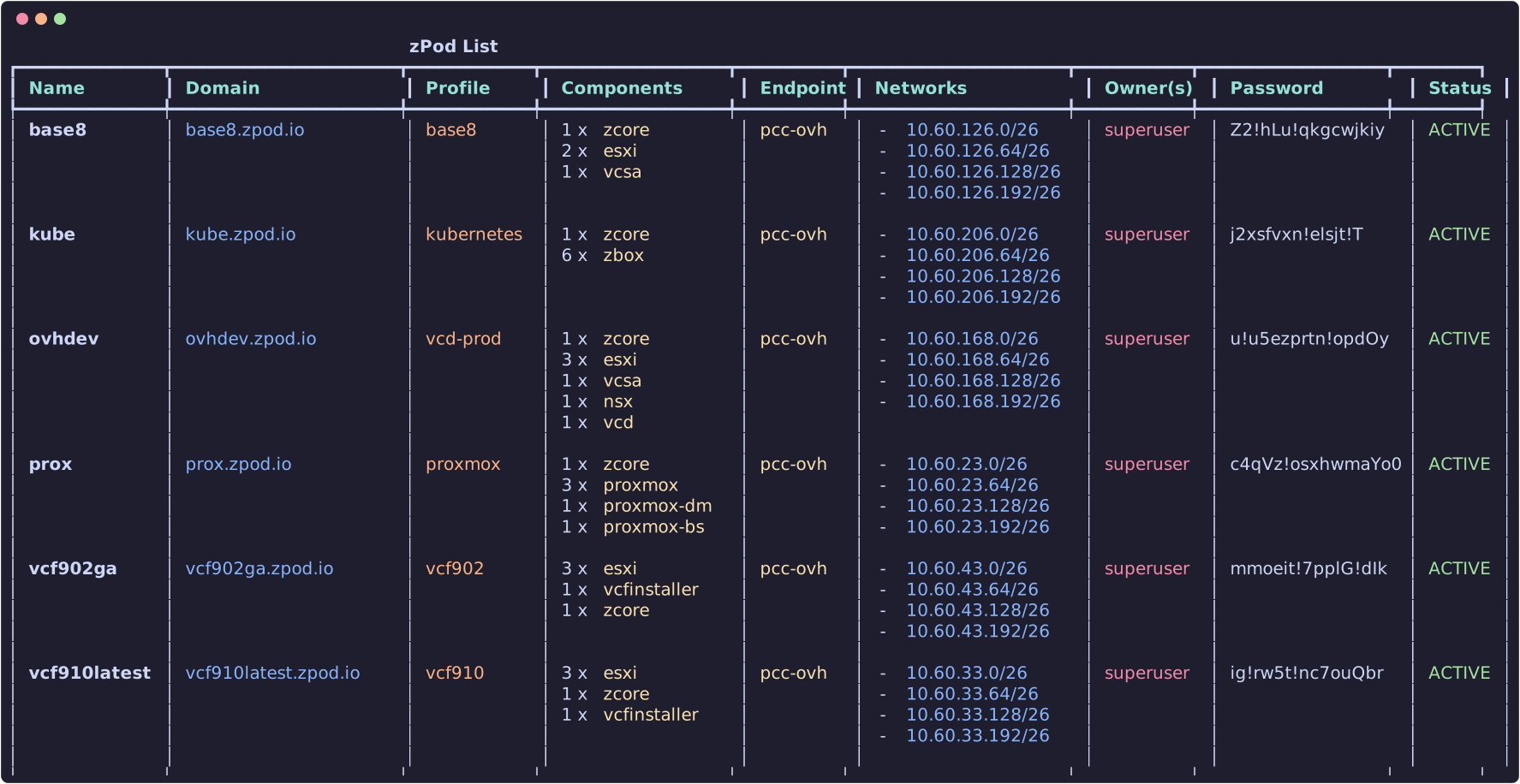
zPods are the nested environments name in the zPodFactory framework.
List zPods
Create zPods
To create a zPod you will need to provide a few parameters:
name: The name of the zPod (must start with a letter; emoji characters are rejected). Non-superadmin users may be required to prefix names with their username whenff_restrict_zpod_with_username_prefixis enabled.profile: The profile to use (usezcli profile list). Ifff_zpod_default_profileis set,--profilecan be omitted.endpoint: The endpoint to deploy onto (usezcli endpoint list). If only one endpoint exists, it is selected automatically.
Additional options:
zcli zpod create <name> -p <profile> -e <endpoint> \
  --description "My lab" \
  --domain custom.domain.lab \   # optional domain override
  --enet <enet_name> \           # optional ENET override
  --wait                         # wait until deploy completes
For example:
This will create a zPod with the following attributes:
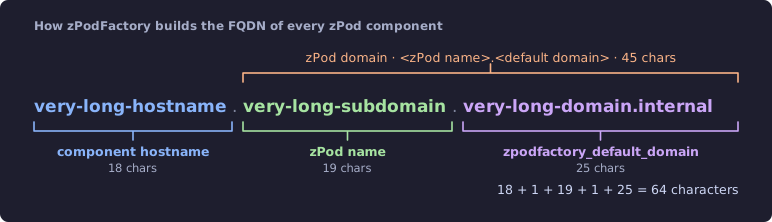
name:test— concatenated withzpodfactory_default_domainfor the zPod FQDN (test.zpodfactory.domain). The core appliance is atzcore.test.zpodfactory.domain.
Info
The base domain is configured by the zpodfactory_default_domain setting and should not be changed after initial setup.
Check Manage settings for more information.
Every component FQDN is built the same way, <hostname>.<zPod name>.<default domain>:
-
profile:base— deploys the components defined in that profile. A typicalbaseprofile includes:zcore-13.5(mandatory core: DNS/DHCP, NFS, guest VLAN routing)esxi-8.0u3i(Host Id: 11, CPU: 4, Mem: 48GB)esxi-8.0u3i(Host Id: 12, CPU: 4, Mem: 48GB)vcsa-8.0u3i
Info
The base profile is a profile that can ONLY be configured by an Administrator.
Check Manage profiles for more information.
endpoint:sddc-labwill reference the endpoint to use to deploy the zPod. In this case it will be thesddc-labendpoint that is configured by an Administrator, and should link to the physical environment that will host this zPod nested environment.
Info
The sddc-lab endpoint is an endpoint that can ONLY be configured by an Administrator.
Check Manage endpoints for more information.
Accessing the zPod
Once deployed, inspect connection details with:
This shows networking, component URLs, credentials, and Proxmox UI links where applicable. Use -j for JSON or -f bnc to filter panels (Basic, Networking, Components).
For vCenter:
username:administrator@name.zpodfactory.domainpassword: Each zPod has a generated password — fetch it fromzcli zpod listorzcli zpod info.
For other components, use the default administrator account for that product (root, admin, etc.; administrator for VCD). The password is always the zPod password.
Destroy zPods
Warning
This will destroy the zPod and all its components without confirmation, and will not be recoverable.
Manage components
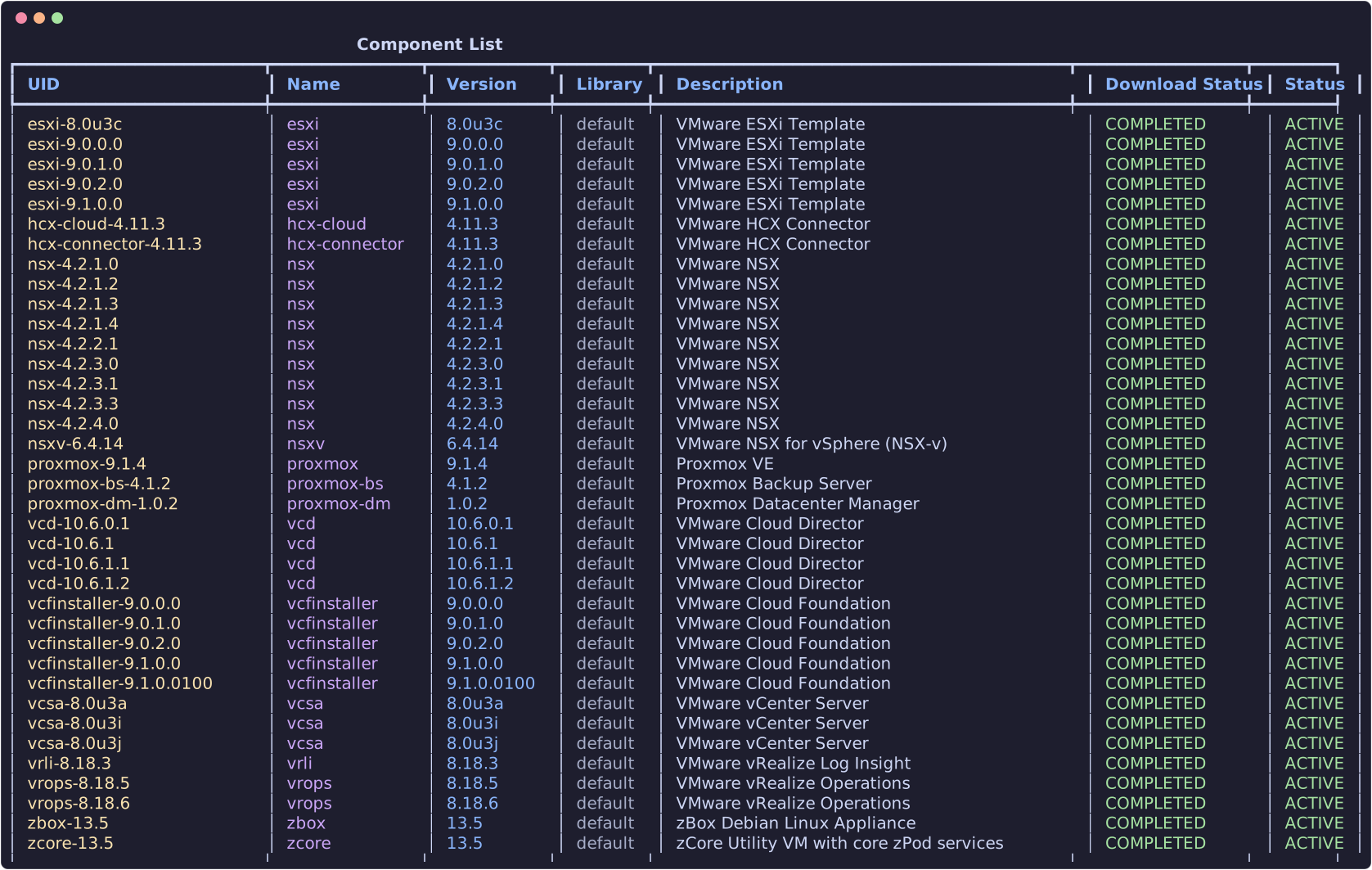
In the previous section we deployed a zPod with the base profile, which does not contain many products, but only the bare minimum to have a functional nested environment.
Here we will show you how to list the available components, and add a new component to a deployed/available zPod.
List components
List components of a zPod
You will need to provide the zpod name parameter so that the CLI knows which zPod to list the components from.

Add components to a zPod
Provide the component_uid (use zcli component list). Optional overrides match profile fields — useful for ESXi hosts that need custom sizing:
| Flag | Type | Example |
|---|---|---|
--host-id |
integer | 13 |
--hostname |
string | esxi13 |
--vcpu, --vmem |
integer | 16, 128 |
--vnics |
integer | 4 (vNIC count, not a JSON object) |
--vdisks |
integer (repeatable) | --vdisks 40 --vdisks 800 → disks of 40 GB and 800 GB |
Example aligned with a VCF-style profile entry (see zcli profile info vcf-902-3hosts):
zcli zpod component add <zpod_name> -c esxi-9.0.2.0 \
  --host-id 13 --hostname esxi13 \
  --vcpu 16 --vmem 128 \
  --vnics 4 \
  --vdisks 40 --vdisks 800
In profile JSON the same host would look like:
{
  "component_uid": "esxi-9.0.2.0",
  "host_id": 13,
  "hostname": "esxi13",
  "vcpu": 16,
  "vmem": 128,
  "vnics": 4,
  "vdisks": [40, 800]
}
Example:
Supported component families include VMware products (vSphere, NSX, VCF, HCX, etc.) and Proxmox (proxmox, proxmox-dm, proxmox-bs).
Manage DNS records
Since version 0.7.2, DNS records can be managed dynamically through the CLI. This requires a zcore-* (or legacy zbox-*) core component in the deployment profile.
The core appliance serves the zPod's DNS zone, <zPod name>.<default domain>. Every platform-managed record in it follows the component FQDN shape:
Warning
Do not change DNS records for zPodFactory-managed components. Hostnames such as zcore, esxi11, vcsa, nsx, and others created by deploy or zpod component add are owned by the platform. Deployments, config scripts, certificate flows, and component lifecycle all assume those names and IPs stay in sync. Updating, re-pointing, or removing them — via zcli zpod dns, the API, or manual edits on the core VM — can break connectivity for the entire zPod and is difficult to recover from cleanly.
Use DNS management only for extra names you add yourself (overlays, guest subnets, demos, external endpoints). Leave platform records alone.
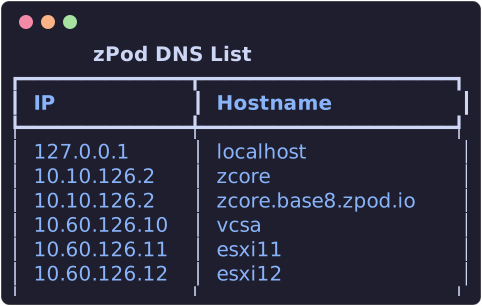
List DNS records to a zPod
List DNS records for a zPod (managed via the core appliance's DNS API):
Add DNS record to a zPod
Adding a DNS record is useful for hostnames on overlay networks or other subnets not auto-managed by component deploy:
You can use 2 different ways to achieve this:
Using --host-id which allows you to set the host id on the management network of a zPod.
192.168.10.11
host-id is the host id on the management network of a zPod. This is explicitely used for profiles so we can easily set specific components configuration that will be deployed on the zpod management subnet and just have to make sure the host-id is set correctly/unique per profile.
Example base profile:
[
  {
    "component_uid": "zcore-13.5"
  },
  [
    {
      "component_uid": "esxi-8.0u3i",
      "host_id": 11,
      "hostname": "esxi11",
      "vcpu": 6,
      "vmem": 48
    },
    {
      "component_uid": "esxi-8.0u3i",
      "host_id": 12,
      "hostname": "esxi12",
      "vcpu": 6,
      "vmem": 48
    }
  ],
  {
    "component_uid": "vcsa-8.0u3i"
  }
]
Resulting DNS records for zPod podname:
zcore.podname.zpodfactory.domain -> 10.10.11.2
esxi11.podname.zpodfactory.domain -> 10.10.11.11
esxi12.podname.zpodfactory.domain -> 10.10.11.12
vcsa.podname.zpodfactory.domain -> 10.10.11.10
Using --ip which allows you to set any IP.
As you can imagine setting any ip, allows you to setup hostnames for any IP address, which can be useful for any use cases leveraging other network subnets (like any overlay network managed by NSX that might be routed within the zPod, etc)
Update DNS record on a zPod
Remove DNS record from a zPod
Remove a DNS record can be done using the below command line:
Warning
You are responsible for any DNS record change, as deleting one of the core components WILL completely break the zPod.