DNS records
Since version 0.7.2, DNS records can be managed dynamically through the CLI. This requires a zcore-* (or legacy zbox-*) core component in the deployment profile.
The core appliance serves the zPod's DNS zone, <zPod name>.<default domain>; see How zPod DNS works.
Warning
Do not change DNS records for zPodFactory-managed components. Hostnames such as zcore, esxi11, vcsa, nsx, and others created by deploy or zpod component add are owned by the platform. Deployments, config scripts, certificate flows, and component lifecycle all assume those names and IPs stay in sync. Updating, re-pointing, or removing them — via zcli zpod dns, the API, or manual edits on the core VM — can break connectivity for the entire zPod and is difficult to recover from cleanly.
Use DNS management only for extra names you add yourself (overlays, guest subnets, demos, external endpoints). Leave platform records alone.
How zPod DNS works
DNS is a hierarchical system that resolves names to IP addresses. In zPodFactory the main domain is set using the zpodfactory_default_domain variable
This domain is used to configure the DNS server running on the zPodFactory VM. The DNS server is configured to resolve all domain set by the zpodfactory_default_domain to the IP address of the zPodFactory VM
Then for EACH zPod deployed, they get their own unique subdomain
The subdomain is composed of the zPod name and the zpodfactory_default_domain
For example, if the zpodfactory_default_domain is set to zpodfactory.local and the zPod name is zpod-a, then the subdomain will be zpod-a.zpodfactory.local.
Every component deployed in that zPod then gets its FQDN as <hostname>.<zPod name>.<default domain>, for example esxi11.zpod-a.zpodfactory.local:
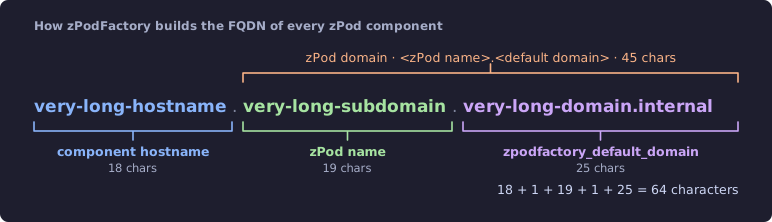
The total length of that FQDN is validated at creation time against the 64-character Linux hostname limit — see zpodfactory_fqdn_reserved_chars.
Warning
Every zPod has a unique name, as it's used to generate the subdomain. If you try to deploy a zPod with the same name as an existing one, the deployment will fail
Quick representation on how it works:
- The
zpodfactory_default_domainis set tozpod.labin this example, and is hosted by the zPodFactory VM.- the local dnsmasq service is configured to resolve
zpod.lab
- the local dnsmasq service is configured to resolve
-
The subdomain
chicago.zpod.labis delegated to the zPod Chicagozcore(legacy zPods may usezbox)- the subdomain
paris.zpod.labis delegated to the zPod Pariszcore
- the subdomain
-
The zPod Chicago is deployed with the name
chicago- The local dnsmasq service on the chicago
zcoreis configured to resolve all names ending withchicago.zpod.lab
- The local dnsmasq service on the chicago
-
The zPod Paris is deployed with the name
paris- The local dnsmasq service on the paris
zcoreis configured to resolve all names ending withparis.zpod.lab
- The local dnsmasq service on the paris
graph TD

    subgraph zpodfactory["zPodFactory VM"]
        setting["setting 'zpodfactory_default_domain' = 'zpod.lab'"]
        global_domain("zpod.lab")

        setting -- "managed by dnsmasq\n\ndomain=zpod.lab\nlocal=/zpod.lab/" --> global_domain

    end

    subgraph zpod_chicago["zPod Chicago"]
        zpod_chicago_domain("chicago.zpod.lab");


        zpod_chicago_zbox("zcore = 'zcore.chicago.zpod.lab'\n\n10.196.162.2");
        zpod_chicago_vcenter("vcsa = 'vcsa.chicago.zpod.lab'\n\n10.196.162.10");

        zpod_chicago_domain --> zpod_chicago_zbox
        zpod_chicago_zbox -- manages with dnsmasq --> zpod_chicago_domain
        zpod_chicago_domain --> zpod_chicago_vcenter
    end

    subgraph zpod_paris["zPod Paris"]
        zpod_paris_domain("paris.zpod.lab");


        zpod_paris_zbox("zcore = 'zcore.paris.zpod.lab'\n\n10.196.131.2");
        zpod_paris_vcenter("vcsa = 'vcsa.paris.zpod.lab'\n\n10.196.131.10");
        zpod_paris_domain --> zpod_paris_zbox
        zpod_paris_zbox -- manages with dnsmasq --> zpod_paris_domain
        zpod_paris_domain --> zpod_paris_vcenter
    end


    global_domain -- "delegate subdomain\nserver=/chicago.zpod.lab/10.196.162.2" --> zpod_chicago_domain
    global_domain -- "delegates subdomain\nserver=/paris.zpod.lab/10.196.131.2" --> zpod_paris_domain
This also means any zPod Admin owns his subdomain and can add DNS entries on that zPod's local DNS server.
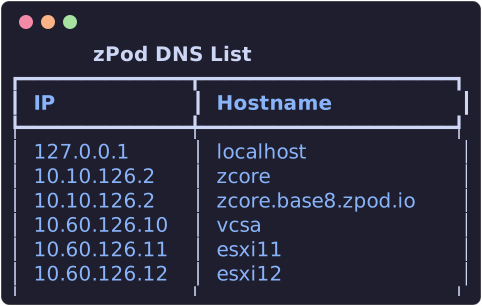
Since zcore-13.5, component hostnames (the <hostname> part of the FQDN shown above) are added automatically when zPodFactory deploys or adds components. The zPod Engine calls the core appliance's zboxapi /dns API, which writes records into /etc/hosts and reloads dnsmasq — you no longer maintain a large static /etc/hosts template on the core VM. A fresh zcore image only seeds localhost and the core hostname itself; everything else appears as components come up.
List DNS records to a zPod
List DNS records for a zPod (managed via the core appliance's DNS API):
Add DNS record to a zPod
Adding a DNS record is useful for hostnames on overlay networks or other subnets not auto-managed by component deploy:
You can use 2 different ways to achieve this:
Using --host-id which allows you to set the host id on the management network of a zPod.
192.168.10.11
host-id is the host id on the management network of a zPod. This is explicitely used for profiles so we can easily set specific components configuration that will be deployed on the zpod management subnet and just have to make sure the host-id is set correctly/unique per profile.
Example base profile:
[
  {
    "component_uid": "zcore-13.7"
  },
  [
    {
      "component_uid": "esxi-8.0u3i",
      "host_id": 11,
      "hostname": "esxi11",
      "vcpu": 6,
      "vmem": 48
    },
    {
      "component_uid": "esxi-8.0u3i",
      "host_id": 12,
      "hostname": "esxi12",
      "vcpu": 6,
      "vmem": 48
    }
  ],
  {
    "component_uid": "vcsa-8.0u3i"
  }
]
Resulting DNS records for zPod podname:
zcore.podname.zpodfactory.domain -> 10.10.11.2
esxi11.podname.zpodfactory.domain -> 10.10.11.11
esxi12.podname.zpodfactory.domain -> 10.10.11.12
vcsa.podname.zpodfactory.domain -> 10.10.11.10
Using --ip which allows you to set any IP.
As you can imagine setting any ip, allows you to setup hostnames for any IP address, which can be useful for any use cases leveraging other network subnets (like any overlay network managed by NSX that might be routed within the zPod, etc)
Update DNS record on a zPod
Remove DNS record from a zPod
Remove a DNS record can be done using the below command line:
Warning
You are responsible for any DNS record change, as deleting one of the core components WILL completely break the zPod.